

The ADHD planner app that respects how you actually work
By morning, it knows how much you can carry. Priority queues that follow your real pace, time set aside for deep focus, and just one step in front of you at a time.
Write the product proposal
Also on today’s timeline
Priority queues
MLFQ lanesFour hours after work, and nine tasks circling your head
You are not lazy, and you do not lack motivation. Most task lists just do not know how long things really take you.
Staring at an intimidating wall of tasks
After work you have three or four hours and nine things in your head. You sit at your desk, open your digital list, and freeze. Every bullet point demands immediate attention, but none of them gives you an obvious place to start. Your cursor hovers, twenty minutes slip away in silence, and task paralysis sets in before you write a single word.
The thirty-minute task that took two hours
You pick a project that feels simple enough to handle. You told yourself the proposal would take half an hour. It took two. Unforeseen research questions, wording revisions, and formatting adjustments stretch the clock. By the time you finish, your evening has completely collapsed, leaving you exhausted and behind schedule.
Avoiding the task that slipped three times
The same administrative task has slipped three times. Each deferral adds a layer of quiet dread. By day four, you avoid even looking at it on your screen. Most lists just paint it red and never ask why it slipped.
Starting tomorrow with clarity and room to breathe
With Foremind, tomorrow morning the Today page shows the one thing in front of you, and why it is first. The proposal already has two hours, because that is how long this kind of task really takes you. You work with generous margins rather than frantic pressure. When you pause, you leave a note about where you stopped, and it is there when you come back.
Built to support your brain, not push you into exhaustion
Discover how priority queues, adaptive time estimates, and context-preserving focus sessions give you a calm external structure for getting things done.
Multi-level priority queues instead of flat lists
Traditional four-quadrant approaches lump all important, non-urgent work into a single bucket. In practice, massive creative projects compete directly with short errands, and heavy tasks stall indefinitely. Foremind adopts multi-level feedback queues (MLFQ) inspired by computer operating systems, dividing work into Q0 through Q4.
Important work is split into quick progress (Q1) for fast momentum, and deep thinking (Q2) requiring dedicated time blocks. Hard deadline items in Q0 are surfaced first so real consequences are cleared. A batch of quick wins builds energy, and Q4 distractions are never pushed into Today on their own.
Learned time estimates based on 180 days of actual completions
Our minds routinely underestimate the time required to complete creative or analytical tasks. As a specialized time blocking app and AI daily planner, Foremind analyzes your last 180 days of actual completion data. It weights recent records more heavily and looks separately at task type, project, energy type and hour of day.
When you defer a task, Foremind quietly returns it to your pool and budgets a wider cushion next time. Furthermore, passive waiting processes like downloading assets or printing run in parallel without eating into your precious focus budget.
Distinct dates that prevent artificial overdue anxiety
Much of planner anxiety comes from treating casual target days as rigid drop-dead deadlines. In Foremind, your planned date represents an intention to work on a task, not a crisis if it slips. When a planned date passes, no overdue label appears. A task that slipped carries a small gray line in the project list instead, such as Deferred 3× · last Oct 24.
Hard deadlines are reserved for obligations with genuine real-world consequences, turning red only when their firm date has elapsed. Time blocks on your daily timeline can be dragged or arranged automatically, and expected finish dates calculated by the scheduler never overwrite your deadlines.
Pause notes, session reviews, and soft-pinned tasks
Interruption is part of life. When you tap pause on Today, Foremind asks for a quick reason (interrupted, stuck, low energy, something came up, or more urgent work) and prompts you to write two quick lines: where you stopped and your next step. When you resume, those two lines are waiting for you.
When time is up (the focus time runs out, the last time block ends, or the planned day passes), a short review asks once whether you finished. If not, choose: continue today, move it to another day, wait for a condition, split out a smaller step, or cancel. After the third time a task is left unfinished, it moves to the top of Today marked Left unfinished 3 times, and the review no longer offers continue today.
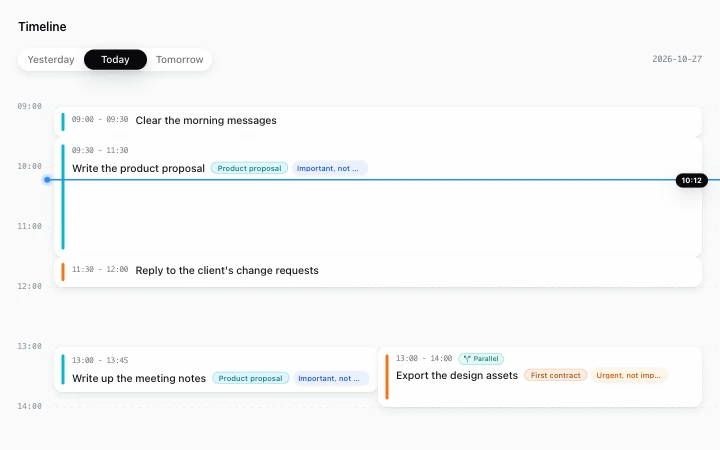
Today's timeline: two hours held for the product proposal, a line at the current time, and a task that doesn't need full attention running in parallel.
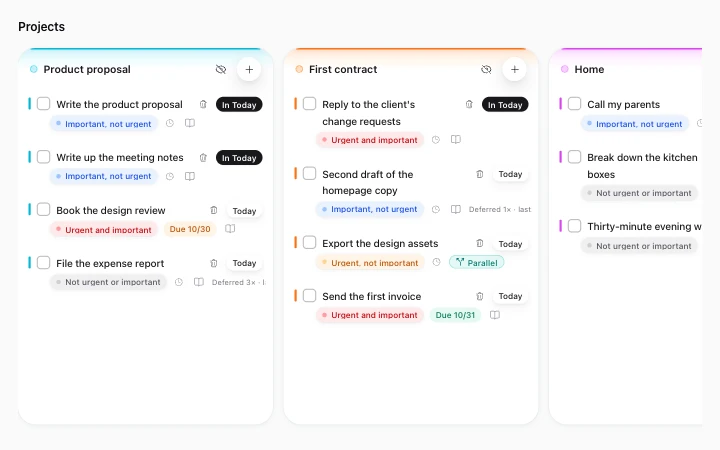
Project columns (Product proposal, First contract, Home): unfinished tasks stay in their project with their priority and how many times they were deferred.
Honest boundaries: what Foremind does and what it will not do
Building reliable habits requires knowing the clear constraints and ethical edges of your tools.
Not a medical product or clinical treatment
Foremind is a productivity workspace and ADHD task manager designed to reduce mental clutter. It is not medical software, does not diagnose or treat medical conditions, and does not replace medical care, psychotherapy, or medication. Being ADHD-friendly here means visible queues, time set aside from your real record, and pause notes, so there is less to hold in your head.
Where it turns red and when it reminds you
A task with a deadline shows its deadline tag, and the tag turns red once the deadline passes. Tasks with only a planned date show no overdue label. Items on your timeline remind you when they are due, and you can turn reminders off.
You set the order
Drag tasks between groups yourself, or let AI sort them. Today pushes one task at a time in front of you, and switching to another one is your call.
The AI assistant guides but never takes the wheel
If you ask in the main conversation what to focus on today, the assistant reads Today’s current order, clarifies what is ranked first, explains why it sits in that position, and notes what is waiting on external events. However, it cannot start, pause, or finish a focus session for you. You always retain direct control over your actions.
Comparison: the usual way versus Foremind
See how deliberate priority scheduling replaces the common pain points of generic task lists.
| The usual way | Foremind |
|---|---|
| Opening your list: dozens of flat tasks with no idea where to start | Today places the single current task in front of you, explaining exactly why it is first |
| Estimating time: you guess 30 minutes, it takes two hours, your evening collapses | Reviews 180 days of real completion data to automatically reserve sufficient time next time |
| Unfinished work: overdue red tags pile up and trigger avoidance | Planned dates show no red overdue labels when passed, keeping only a quiet gray deferral count |
| Deferred repeatedly: the longer you put it off, the more you dread opening the app | Moves to the top after three slips, asking you to reschedule, wait, split smaller, or cancel |
| Getting interrupted: returning later with your context lost | Note where you stopped and the next step on pause, bringing your working state back on resume |
| Waiting on prints or downloads: idle waiting or forgetting to return | Tagged as parallel, allowing waiting periods without blocking your focus time |
Frequently asked questions
Answers about queue structures, estimation learning, and daily focus flows.
Is there a planner app built for ADHD brains?
What are Q0 to Q4, and how is that different from the Eisenhower matrix?
Does time blocking adjust to how long things really take me?
What happens when I keep putting a task off? Does it pile up in red?
What if I get interrupted halfway through?
Will the AI decide my day for me?
Where do I put tasks that are waiting on someone else?
Can Foremind treat ADHD?
Explore more Foremind capabilities
Conversations, life planning, daily execution, and linked knowledge unified in one workspace.
Move at your natural rhythm and find focus
By morning, it knows how much you can carry. Replace task paralysis with an outside structure that supports your mind, protects your energy, and helps you start one manageable step at a time.