

A Markdown editor that writes like plain text and edits like blocks
Write like Markdown. Edit like blocks. Type at your desk with live syntax dimming, then rearrange sections on your phone with modular block cards. An editorial note-taking app crafted for writers, developers, and thinkers.
In the afternoon I want to finish the book I started last week, then get to bed early.
From quiet desk drafting to quick mobile edits on the go
Many writers looking for a Typora alternative love live rendering on a desktop, then miss Craft-style block cards on a phone. Foremind gives you both over the same plain text.
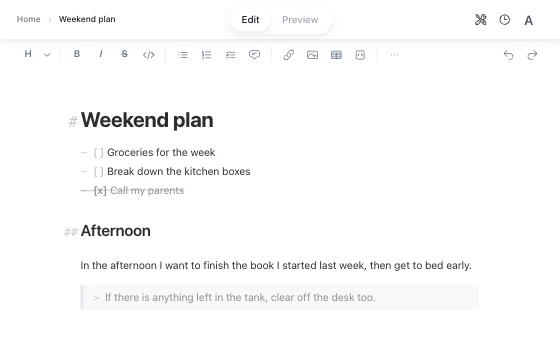
At your desk: Markdown syntax dims as you write
You type at full speed with a physical keyboard. Headings, checklists, and code snippets render immediately while raw hashes and hyphens fade into subtle gray tones. You never split your monitor into two jarring columns of raw code and distant HTML.
On the subway: your draft turns into touchable blocks
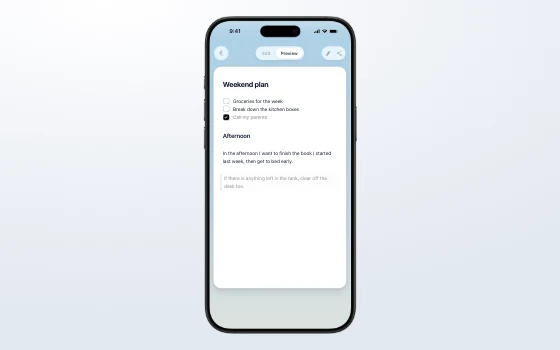
Hunting for a tiny text cursor on a packed train is frustrating. Switching to Preview mode splits your document into clean block cards. You tap any card to edit a single phrase, or drag its grip handle to reorder paragraphs with your thumb.
Dictated notes: AI formatting that touches zero words
You paste a rough voice memo and request structural cleanup. The assistant adds heading tags, task checkboxes, and blockquotes without editing your phrasing. Not one character moves, and Foremind checks it byte for byte.
Clean sharing: one link opens already typeset anywhere
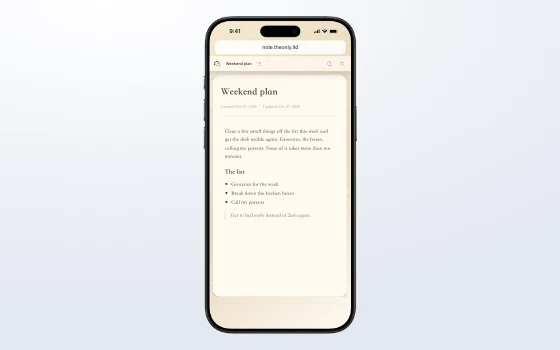
One link. It opens already typeset. Send your reading notes or weekend schedule to a colleague or friend. The link opens in Safari, Chrome, or any mobile browser with balanced typography and generous margins. Readers do not need an account or an app.
How Foremind handles your text under the hood
Here is how live rendering, block editing and lossless AI formatting all work on the same Markdown text.
A unified layout tree for live editing and blocks
In many editors, a few thousand words in, the cursor starts to drift and selections jump. In Foremind the caret, the selection and the highlighting share one layout tree, so nothing drifts.
Edit mode renders Markdown as you type with the marks dimmed. Preview mode turns each section into a block you can tap and drag. Both edit the same plain text.
Tactile block cards on mobile screens
Typing raw syntax on a smartphone keyboard can feel tedious. In Preview mode, Foremind presents your note as rounded cards corresponding to headings, paragraphs, checklist items, and tables.
You can tap any card to adjust its wording, or hold and drag the handle to reorder arguments. Underneath, the note stays plain Markdown you can take with you.
Zero-Tamper Mode: byte-for-byte verified formatting
When you ask AI to clean up raw notes, it tends to tweak your words along the way. Zero-Tamper Mode is built for exactly that worry.
In strict mode, the AI has no permission to write any words. It can only emit instructions to insert Markdown syntax markers like headings, list bullets, or quotes at specific offsets. The system then strips the inserted markers and performs a byte-for-byte check against your original draft. If even a single character differs, the entire formatting draft is rejected, keeping your original text untouched.
- [ ] Get the whole week of groceries
- [ ] Break down the boxes in the kitchen
- [ ] Call my parents
In the afternoon I want to finish the book I started last week, then get to bed early.
> If there is anything left in the tank, clear off the desk too.
Read-only links you can revoke
Publishing your notes should not force your reader to install a client or create a password. When you share a note, you get a read-only link with the same type size, line spacing and theme you saw.
You can revoke the link at any time. After that it no longer opens (copies someone already downloaded cannot be recalled). The link exposes only that single note, keeping your private conversations and other files completely separated. You can also export a standalone HTML file or print straight to PDF.
Local-first storage and a knowledge graph
Your notes are saved on your device first. You can write offline and they sync when you are back online. If two edits conflict, a conflict copy is kept, and you can view and restore earlier versions.
Your folders, notes and the headings inside them grow into a knowledge graph. Double-click a note or heading on the graph to jump back to that spot in the note.
Clear data boundaries and transparent ownership
Your writing belongs entirely to you. Here is exactly what happens to your text.
Plain Markdown you can take with you
Every note is plain Markdown text. Copy it out as is, export a standalone HTML file, or print it to PDF.
A demo that runs in your browser
The Foremind home page has a Zero-Tamper demo that runs the byte-for-byte check inside your browser, so the demo text never leaves your device. In the app, formatting sends your text to the AI model, and a result that fails the check is never written to your note.
Sharing shows one note only
A share link contains only that note. Your conversations, long-term memory and other notes are not included.
What it does not do yet
Foremind focuses on writing and organizing on your own. It has no real-time multi-user editing and no audio transcription.
The usual way versus Foremind
See how live rendering and modular blocks streamline writing and organization compared to conventional tools.
| Writing scenario | The usual way | Foremind |
|---|---|---|
| Long-form writing | Juggling two panes between raw code and preview | Edit mode renders live while syntax markers fade away |
| Editing on a phone | Hunting for a tiny text cursor on a small screen | Document turns into modular blocks: tap to edit, drag to reorder |
| AI formatting | Subtle phrasing modifications that force line-by-line proofreading | Zero-Tamper Mode only inserts structural markers with byte-for-byte verification; one changed character rejects the draft |
| Sharing with others | Exporting file attachments that recipients must download | A clean read-only web link that opens already typeset, revokable anytime |
| Working offline | Notes refuse to open or fail to save changes | Local-first storage lets you write anywhere; syncs on reconnection and keeps conflict copies |
| Exporting notes | Proprietary databases require tedious conversion | Standard plain text Markdown, with direct export to HTML and styled PDF |
Questions about Markdown editing in Foremind
Answers to common inquiries regarding block editing, data safety, and mobile workflows.
What is a good Typora alternative that also works on a phone?
Many writers searching for a Typora alternative love live rendering on a desktop keyboard, but find editing raw Markdown on a mobile screen painful. Foremind gives you live rendering on your computer and modular block editing on your phone. You write raw Markdown at your desk while syntax marks fade, and on iOS or mobile browsers you tap individual blocks to tweak wording or drag them to reorder. Both modes operate on the exact same plain text file.
Is Foremind a WYSIWYG Markdown editor?
Edit mode renders headings, lists, checkboxes, and tables as you type. Syntax symbols like hashes and hyphens dim into the background so you can read comfortably without switching tabs. Because the caret and the selection share one layout tree with the renderer, nothing drifts even several thousand words in.
What does block editing mean here, and does it change my Markdown?
Block editing is an alternate lens on your plain text. In Preview mode, your document separates into distinct cards representing paragraphs, headings, checklists, and code snippets. On a touchscreen, you can tap any block to edit its contents or drag its handle to rearrange your thoughts. Underneath, it stays your Markdown text.
Will AI formatting change my words?
When you enable Zero-Tamper Mode, the AI receives no permission to rewrite your text. It can only emit structural placement instructions that insert Markdown syntax symbols like headings, list markers, and blockquotes into your draft. Once generated, the engine strips those inserted markers and compares the remaining text against your original character by character, byte for byte. If even a single character was altered, the entire formatting draft is discarded, leaving your words intact.
Do people need an account to read a note I share? Can I take it back?
Anyone with your share link can read the typeset note in Safari, Chrome, or any mobile browser without signing up or installing an app. The published view reflects the typography, margins, and theme you chose, while completely excluding your personal memory, chat threads, and other notes. You can revoke the link at any moment. Once revoked, the link stops loading, though copies already saved by readers cannot be retrieved.
Can I write offline?
Foremind is local first. Your notes are saved on your device, so you can keep reading, writing and organizing without a connection. When you reconnect, your edits sync. If concurrent edits happen on two devices, a conflict copy is preserved so no work disappears, and you can inspect or restore earlier versions at any time.
Can I export to HTML or PDF?
Yes. Each note is plain Markdown you can copy out, and you can export a standalone HTML file or print the note to PDF.
Is there a knowledge graph?
Yes. Your folders, notes and the headings inside them grow into a knowledge graph. Double-click a note or heading on the graph to jump back to that spot in the note.
Explore more of the Foremind workspace
Notes are only one part of the picture. See how ongoing conversations, long-term plans, and daily focus integrate into a unified system.
Start writing with clarity and control
Enjoy live Markdown rendering at your desk and modular block editing on your phone.